> For the complete documentation index, see [llms.txt](https://docs.vdo.ninja/llms.txt). Markdown versions of documentation pages are available by appending `.md` to page URLs; this page is available as [Markdown](https://docs.vdo.ninja/guides/phone-call-in-provider-options.md).

# Phone call-in provider options

Phone call-ins require a bridge between the public phone network and the browser. VDO.Ninja can handle the WebRTC side, but a phone provider still needs to supply the phone number, PSTN minutes, SIP trunk, or programmable voice API.

The current recommended direction is bring-your-own provider. A free shared VDO.Ninja dial-in number may be tested later, but it is not the default recommendation yet because phone numbers and PSTN minutes create ongoing cost and abuse risk.

Last reviewed: July 12, 2026.

{% hint style="warning" %}
The call-in feature is experimental. Phone callers are currently mixed into the director/host audio. They do not yet appear as normal VDO.Ninja guest tiles with scene membership, per-guest volume, or the full director control set.
{% endhint %}

## Quick recommendation

| Option              | Current fit                      | Best for                                                             | VDO.Ninja path                        |
| ------------------- | -------------------------------- | -------------------------------------------------------------------- | ------------------------------------- |
| SignalWire          | Best direct BYO candidate today  | Users who want a cheap provider that supports browser SIP-over-WSS   | `&callin=signalwire` or `&callin=sip` |
| Twilio              | Best tested hosted/PIN flow      | Users who have a compatible backend/Worker for token minting         | `&callin=twilio`                      |
| Telnyx              | Good next adapter candidate      | Users who want low-cost WebRTC/PSTN once a Telnyx adapter exists     | Not fully wired yet                   |
| DIY PBX + SIP trunk | Cheapest/flexible, hardest setup | Users with FreePBX, Asterisk, VoIP.ms, IPComms, or another SIP trunk | `&callin=sip`                         |

For a live production today, the non-native fallback is still the most reliable: use a phone app, softphone, hardware mixer, Voicemeeter, OBS monitoring, or virtual audio cables to create two mix-minus feeds. See [Phone call-ins with VDO.Ninja and virtual audio cables](/guides/phone-call-ins-with-vdo-ninja-and-virtual-audio-cables.md).

## Current VDO.Ninja panel

The experimental call-in panel appears when the director URL includes `&callin=sip`, `&callin=signalwire`, or `&callin=twilio`.

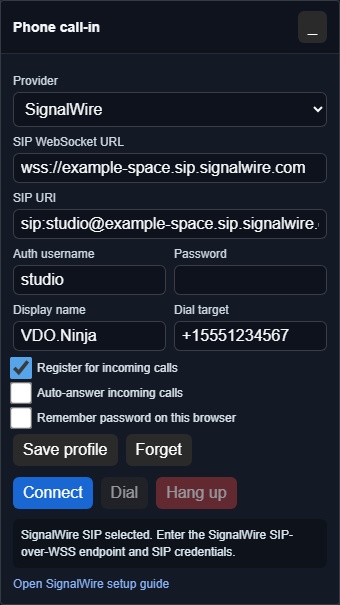
<figure><img src="/files/Eva8Hib6F2FDI2Ok4mkC" alt="VDO.Ninja phone call-in panel in SignalWire mode with SIP WebSocket URL, SIP URI, auth username, password, dial target, and connect controls"><figcaption><p>SignalWire/SIP mode registers the browser as a SIP endpoint over secure WebSockets.</p></figcaption></figure>

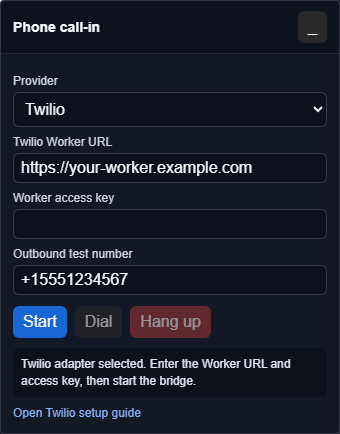
<figure><img src="/files/Cq3qiiC3ccqkfEM1LvGj" alt="VDO.Ninja phone call-in panel in Twilio mode with Worker URL, access key, outbound test number, and start controls"><figcaption><p>Twilio mode requires a compatible backend that mints browser tokens and handles Twilio webhooks.</p></figcaption></figure>

The screenshots above are intentionally using placeholder values. Do not put SIP passwords, Twilio API secrets, or provider account tokens in shared VDO.Ninja URLs.

The bell button controls a browser-local incoming ringtone. Choose the classic ring, bell, chime, a custom uploaded audio file, or silent mode. The ringtone is not sent into the room or returned to the caller.

The upload button opens `fileuploads.vdo.ninja`. Uploaded audio is stored as a public media file by that service; only its HTTPS URL and your ringtone preference are saved in the current browser. Use a short file that you are comfortable hosting there.

## Option 1: SignalWire SIP-over-WSS

SignalWire is the best fit for the current browser-side SIP implementation because it supports SIP over secure WebSockets, which is what browser SIP libraries such as JsSIP need.

High-level flow:

1. Create a SignalWire account and Space.
2. Buy or port a phone number.
3. Create a SIP endpoint/credential.
4. Route the phone number to that SIP endpoint.
5. Open VDO.Ninja with `&callin=signalwire`.
6. Enter the SignalWire SIP WebSocket URL, SIP URI, username, and SIP password in the call-in panel.

The SIP password is entered in the browser panel. It should be a scoped SIP endpoint credential, not a master account API token.

See [SignalWire SIP call-in setup](/guides/signalwire-sip-call-in-setup.md).

## Option 2: Twilio Voice

Twilio is the most tested native call-in path in VDO.Ninja alpha, but it is not a pure browser-only setup.

Twilio's browser Voice SDK uses short-lived Access Tokens. Those tokens are created on a server, not in a public web page. In VDO.Ninja's experimental Twilio path, a compatible backend such as a private Cloudflare Worker mints the browser token, creates a PIN, and answers Twilio's voice webhook.

This gives the easiest operator flow:

1. Director opens VDO.Ninja with `&callin=twilio`.
2. The panel asks the backend for a phone number and PIN.
3. Caller dials the number and enters the PIN.
4. The call is bridged to the browser.

Tradeoff: Twilio is mature, but usually costs more than lower-level SIP providers. Do not put Twilio Account SIDs, Auth Tokens, or API Key Secrets in VDO.Ninja URLs or browser-side JavaScript.

See [Twilio phone call-in setup](/guides/twilio-phone-call-in-setup.md).

## Option 3: Telnyx

Telnyx is a good candidate for a future low-cost adapter. Telnyx has a WebRTC JS SDK and supports browser softphone use cases, but VDO.Ninja does not currently have a complete Telnyx-specific call-in adapter wired into the panel.

Practical status:

* Telnyx can be attractive on price.
* Telnyx's browser flow uses its WebRTC SDK with credential connections and generated login tokens/JWTs, so it is not the same as the current generic SIP-over-WSS form.
* A proper VDO.Ninja integration likely needs a Telnyx-specific WebRTC SDK/JWT flow or a provider-specific backend.
* Until that adapter exists, Telnyx should be treated as a future native option or used behind a DIY PBX/SIP bridge.

## Option 4: DIY PBX plus a cheap SIP trunk

This is the most flexible route if you already know telephony:

1. Buy or reuse a DID from VoIP.ms, IPComms, Telnyx SIP trunking, or another trunk provider.
2. Route the DID to Asterisk, FreePBX, FreeSWITCH, or another PBX/SBC.
3. Configure a browser/WebRTC SIP extension with TLS, SIP over WSS, and compatible media settings.
4. Open VDO.Ninja with `&callin=sip`.
5. Enter the PBX WebSocket URL, SIP URI, auth username, and extension password.

This is where VoIP.ms currently fits best. VoIP.ms is inexpensive and useful as a SIP trunk/DID provider, but the browser still needs a WebRTC/SIP-over-WSS endpoint. In practice, that usually means putting FreePBX, Asterisk, FreeSWITCH, or another PBX/SBC between VoIP.ms and VDO.Ninja.

The PBX extension must be configured for WebRTC media, not only SIP over WSS. It needs DTLS-SRTP, ICE, AVPF, RTCP mux, and a DTLS fingerprint in its SDP offer. A normal extension may register and work in MicroSIP but fail when answered in Chrome or Edge with `488 Not Acceptable Here` because browsers will not accept plain RTP audio.

Also note that trusting a PBX's HTTPS/WSS certificate fixes the signaling connection only. DTLS-SRTP and its fingerprint are a separate requirement for the call audio.

## Why a backend is needed

A normal browser page should not contain phone-provider account secrets. Providers such as Twilio, SignalWire, and Telnyx use API keys or account tokens to buy numbers, mint browser tokens, and validate webhooks. Those account-level secrets need to live on a backend service, such as a Cloudflare Worker, or remain in the provider/PBX dashboard.

For hosted/PIN systems, the backend typically does four jobs:

1. Mint a short-lived browser calling token.
2. Create a temporary PIN that maps a phone caller to one VDO.Ninja director page.
3. Answer the provider's webhook when a phone call arrives.
4. Route the call to the registered browser client after the caller enters the PIN.

The audio itself should flow between the browser and the provider. The backend should not normally proxy live audio.

SIP-over-WSS is different: the browser logs in as a SIP endpoint directly. In that model, use a scoped SIP extension password. Do not use a master provider API key as the SIP password.

## Audio flow

Regardless of provider, the same mix-minus rule applies:

| Destination             | Should hear                | Should not hear       |
| ----------------------- | -------------------------- | --------------------- |
| Phone caller            | Host plus VDO.Ninja guests | Phone caller          |
| VDO.Ninja guests        | Host plus phone caller     | Themselves delayed    |
| Livestream or recording | Host, guests, and caller   | Usually no exclusions |

The experimental VDO.Ninja call-in paths attempt to create that return mix in the browser. If you are routing calls outside the browser, use the virtual-audio-cable guide instead.

## Credential handling

Use the least powerful credential that can work:

| Credential type                        | Store in browser?                                | Notes                                                  |
| -------------------------------------- | ------------------------------------------------ | ------------------------------------------------------ |
| SIP extension username/password        | Acceptable for testing if scoped to one endpoint | Enter manually; do not put it in a shared URL.         |
| Twilio API Key Secret or Auth Token    | No                                               | Backend only. Used to mint short-lived browser tokens. |
| SignalWire or Telnyx project API token | No                                               | Backend or provider dashboard only.                    |
| Temporary browser token/JWT            | Yes                                              | Short-lived and provider-scoped.                       |

The current SIP panel can optionally remember a SIP profile in the local browser. Saving the SIP password is opt-in and should only be used on a trusted production machine. Browser local storage is convenience storage, not protection against XSS, browser profile compromise, or a shared computer.

Do not put provider account secrets or SIP passwords in shared VDO.Ninja URLs.

## Free shared VDO.Ninja number

A single free VDO.Ninja-hosted number may be reasonable as a trust-based beta later, but it should start with strict guardrails:

* Short PIN expiry.
* One active caller per room/session.
* Maximum call duration.
* Global concurrency cap.
* Monthly/manual spend cap.
* Failed PIN throttling.
* No outbound PSTN calls.

The inbound-only design avoids outbound toll fraud, but it does not avoid inbound cost abuse. If usage grows beyond a small monthly budget, account linking or access gating would be needed.

## Current experimental parameters

| Parameter                                             | Purpose                                                                              |
| ----------------------------------------------------- | ------------------------------------------------------------------------------------ |
| `&callin=sip`                                         | Show the SIP/PBX panel.                                                              |
| `&callin=signalwire`                                  | Show the same SIP-over-WSS panel with SignalWire-specific copy.                      |
| `&callin=twilio`                                      | Show the Twilio call-in adapter when available.                                      |
| `&callinapi=https://example.com`                      | Point the Twilio adapter at a compatible backend.                                    |
| `&callinoutput=DeviceName` or `&sipoutput=DeviceName` | Route the local call monitor to a named output device when supported by the browser. |
| `&sipwss=wss://pbx.example.com:8089/ws`               | Pre-fill the SIP WebSocket endpoint.                                                 |
| `&sipuri=sip:1001@example.com`                        | Pre-fill the SIP URI.                                                                |
| `&sipuser=1001`                                       | Pre-fill the SIP auth username.                                                      |
| `&siptarget=sip:1002@example.com`                     | Pre-fill the outbound SIP dial target.                                               |
| `&sipauto=1`                                          | Register the SIP endpoint automatically when the page loads.                         |
| `&sipautoanswer=1`                                    | Automatically answer incoming SIP calls after registration.                          |

Do not put provider account secrets or SIP passwords in shared URLs.

## Provider links and price checks

Prices change. Check each provider's current pricing before buying numbers or leaving a DID active.

* [SignalWire voice pricing](https://signalwire.com/pricing/voice)
* [SignalWire SIP-over-WebSockets overview](https://signalwire.com/blogs/product/webrtc-using-sip-over-websockets)
* [Twilio Voice pricing](https://www.twilio.com/en-us/voice/pricing/us)
* [Twilio Access Tokens](https://www.twilio.com/docs/iam/access-tokens)
* [Telnyx WebRTC browser guide](https://developers.telnyx.com/docs/voice/webrtc/make-a-call-to-a-web-browser)
* [Telnyx Elastic SIP pricing](https://telnyx.com/pricing/elastic-sip)
* [VoIP.ms pricing](https://voip.ms/pricing)

## Related guides

* [Phone call-ins with VDO.Ninja and virtual audio cables](/guides/phone-call-ins-with-vdo-ninja-and-virtual-audio-cables.md)
* [SignalWire SIP call-in setup](/guides/signalwire-sip-call-in-setup.md)
* [Twilio phone call-in setup](/guides/twilio-phone-call-in-setup.md)


---

# Agent Instructions
This documentation is published with GitBook. GitBook is the documentation platform designed so that both humans and AI agents can read, navigate, and reason over technical content effectively. Learn more at gitbook.com.

## Querying This Documentation
If you need additional information that is not directly available in this page, you can query the documentation dynamically by asking a question.

Perform an HTTP GET request on the current page URL with the `ask` query parameter, and the optional `goal` query parameter:

```
GET https://docs.vdo.ninja/guides/phone-call-in-provider-options.md?ask=<question>&goal=<endgoal>
```

`ask` is the immediate question: it should be specific, self-contained, and written in natural language.
`goal` is optional and describes the broader end goal you are ultimately trying to accomplish on behalf of the user. GitBook uses it to tailor the answer towards what is most useful for that goal.

The response will contain a direct answer to the question and relevant excerpts and sources from the documentation.

Use this mechanism when the answer is not explicitly present in the current page, you need clarification or additional context, or you want to retrieve related documentation sections.